December 11, 2025

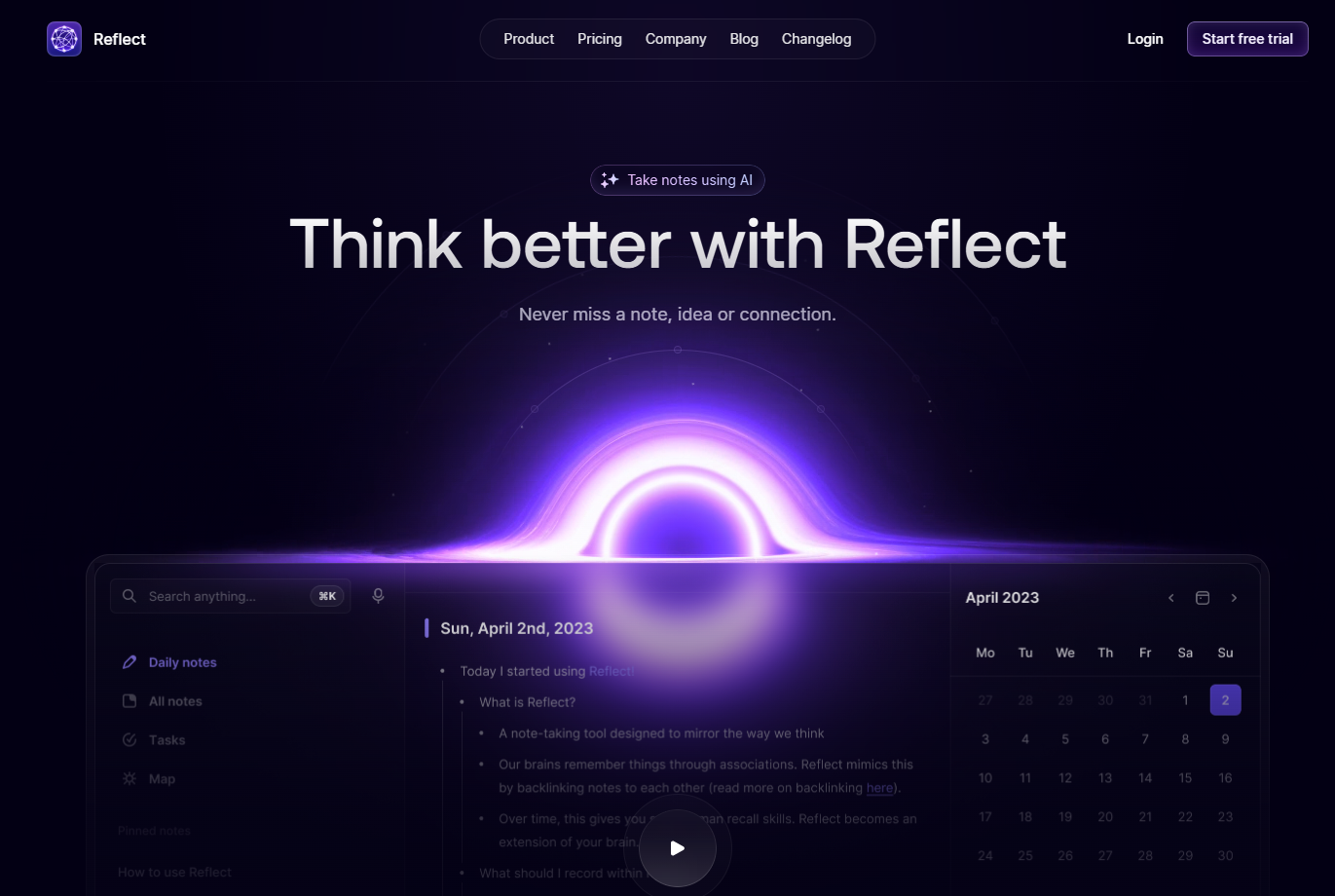

Are you searching for a way to bring order to your thoughts and supercharge your productivity? The Reflect app offers a refreshing approach to note taking, creating a centralized workspace for your ideas, meetings, and personal reflections. It’s more than just a digital notebook; it’s designed to be your "second brain," helping you connect concepts and uncover new insights. If you want to elevate how you capture and process information, Reflect might be the perfect tool for you.
The Reflect notes app is a modern, intuitive application built to enhance how you capture, organize, and retrieve information. With a strong emphasis on creating a personal "second brain," it helps you build a network of connected knowledge. User feedback in many a Reflect app review highlights its clean design and powerful features.
Its AI capabilities are a standout, streamlining your writing process and helping you make sense of your notes. From transcribing audio to summarizing text, the app uses artificial intelligence to do the heavy lifting for you. Let's explore what Reflect is, who it's for, and why digital note-taking is more important than ever.
So, what exactly is the Reflect notes app? Think of it as a comprehensive digital workspace designed to be intuitive and powerful. It serves a wide range of users, from students and researchers to busy professionals, by making it easy to manage information efficiently. The core idea is to provide one place for all your thoughts, ideas, and tasks.
The app functions by combining traditional note-taking with modern technology. You can type notes, create daily entries, and use bi-directional links to connect related thoughts. This creates a web of knowledge that mirrors how your brain makes associations.
Furthermore, its integration with AI allows for advanced functions like voice transcription, which is perfect for capturing ideas on the move or taking meeting notes without typing. You can even chat with your notes to uncover new insights, making your personal knowledge base interactive and dynamic.
Reflect is incredibly versatile, making it suitable for anyone looking to organize their digital life and improve their thinking. If you find yourself overwhelmed by scattered notes and disconnected ideas, this app can provide the structure you need. Its minimalist design helps you focus on the writing process without unnecessary distractions.
The app is particularly well-suited for:
For those specifically interested in artificial intelligence, Reflect is an excellent choice. The AI-powered features are integrated directly into the workflow, from audio transcription to text summaries. The mobile app also ensures you have these powerful tools right in your pocket.
In today's world of information overload, effective digital note-taking has become a critical skill. We consume vast amounts of content daily, and without a proper system, valuable insights can easily be forgotten. Tools like Reflect address this challenge by providing a structured way to capture, connect, and revisit information.
Unlike traditional paper notebooks, digital platforms offer powerful features like search, syncing, and linking. The ability to connect your notes to your Google Calendar, for instance, adds context to your daily entries and meeting minutes. This transforms your notes from static text into a dynamic and interconnected knowledge base.
Moreover, the rise of AI integration in note-taking apps is a game-changer. It automates tedious tasks, helps you find patterns in your thinking, and even assists in drafting content. By embracing a robust digital note-taking system with features like daily notes and AI assistance, you can boost your memory and productivity significantly.
Jumping into the Reflect notes app is a straightforward and welcoming experience. The app is designed to get you from setting up to actively writing with minimal friction, so you can focus on what matters: your thoughts. The initial setup is quick, allowing you to connect your calendar and start creating notes right away.
Whether you're on your desktop or using the mobile app, the clean interface guides you through the writing process. In the following sections, we'll walk you through creating your first note, navigating the app, and offer tips to help you maximize your productivity from day one.
Creating your first note in Reflect is as simple as opening the app and starting to type. When you launch Reflect, it opens to your daily notes page, encouraging you to capture thoughts as they come. There’s no need to worry about folders or complex organization upfront.
Reflect supports some markdown for formatting, which it converts into rich text. This makes your notes look clean and readable without you having to see the raw code. For example, you can create headings by typing hashtags, but be aware that changing heading levels requires highlighting the text or retyping the hashtags.
To add more structure or special content to your notes, you can use "/Slash" commands. This is a quick way to access various features without lifting your hands from the keyboard. Here are a few things you can do:
The user interface in Reflect is designed to be clean, minimalist, and free of distractions. This helps you focus on your thoughts rather than getting bogged down by complicated menus and settings. The main workspace is where you'll do your writing, with a simple and intuitive text editor.
Navigation is handled primarily through the left sidebar and a powerful search function. The sidebar displays your calendar events, making it easy to create meeting notes with a single click. The search feature, accessible with a keyboard shortcut (⌘ K on Mac), is fast and effective, though it currently lacks advanced filtering syntax.
This seamless experience extends from the desktop app to the mobile app for iOS. The design remains consistent, allowing you to move between devices without a learning curve. Whether you're at your desk or on the go, your notes and navigation tools are always familiar and accessible.
To get the most out of the Reflect app right from the start, it helps to build a few key habits. These simple practices can transform your note-taking and boost your overall productivity, turning your workspace into a powerful tool for thinking.
First, embrace the daily note. Make it a habit to open Reflect each morning and jot down tasks, ideas, or reflections. This consistency builds a valuable log of your activities and thoughts over time. Also, take full advantage of the calendar sync feature to link your notes directly to your meetings and events.
Here are a few more tips to help you get started:
The Reflect notes app is packed with powerful features designed to make thinking and organization feel effortless. It goes beyond basic note-taking by offering tools that help you connect ideas and automate tedious tasks. The AI-driven functionalities are at the forefront, transforming how you interact with your own knowledge.
From its unique linking system to its seamless calendar sync, every feature is thoughtfully implemented. You'll find that the combination of daily notes, smart organization tools, and AI assistance creates a truly next-level experience. Let's look closer at the core features that make Reflect stand out.
One of the most impressive aspects of Reflect is its deep AI integration. The app uses advanced models like GPT-4 and Whisper to enhance your writing process and organization. This isn't just a gimmick; it's a functional tool that saves you time and helps you think more clearly.
For example, the voice transcription feature allows you to capture thoughts hands-free, turning your spoken words into text within your daily notes. This is perfect for brainstorming on the go or recording meeting highlights without having to type.
The AI can also help you refine your writing and uncover new connections. Here are some of the key AI features:
A core concept behind the Reflect app is the idea of building a "second brain," and bi-directional linking is the feature that makes this possible. Unlike traditional one-way hyperlinks, this system creates a two-way connection between your notes. When you link from Note A to Note B, a backlink automatically appears in Note B, pointing back to Note A.
This intuitive system allows you to create a web of interconnected knowledge inside your workspace. You can easily navigate between related ideas, see how different concepts influence each other, and maintain context as you explore your thoughts. It’s a powerful way to visualize the relationships within your information.
By using backlinks and bi-directional linking, you move beyond simple, isolated notes. You start building a network that grows and becomes more valuable over time. This feature is what truly transforms Reflect from a digital notebook into a dynamic tool for thinking and learning.
Reflect offers a flexible approach to organization that prioritizes speed and reduces friction. Instead of relying on a rigid folder structure, the app uses tags and hashtags to categorize and retrieve notes. This method allows a single note to belong to multiple categories, reflecting the complex nature of information.
The app's philosophy is that spending too much time thinking about which folder a note belongs in can hinder productivity. While some users may miss a traditional folder hierarchy, using tags allows for a more fluid system. You can quickly add hashtags to your notes to group them by topic, project, or status.
This approach offers several benefits for organization and productivity:
To be a truly effective note-taking tool, an app needs to be available wherever you are. Reflect delivers on this with a multi-platform approach, ensuring you can access your notes whether you're at your desk or on the move. It offers dedicated desktop and mobile apps as well as web access.
Beyond its own platform availability, Reflect also connects with other tools you use every day. These integrations, which include calendar services and automation tools like Zapier, extend the app's functionality and help it fit seamlessly into your existing workflow. In the next sections, we'll explore these options in more detail.
Reflect ensures you can access your notes across your favorite devices. For desktop users, there is a dedicated app for Mac that provides the full, feature-rich experience. This is ideal for deep work sessions where you need a focused environment to write and organize your thoughts.
For access on the go, Reflect offers a powerful mobile app for iOS devices, including the iPhone and iPad. This app brings key features like note creation, voice transcription, and task management to your fingertips. It's perfect for capturing ideas as they happen or reviewing notes before a meeting.
While there is currently no native app for Android, users can still access their notes via the web. Reflect also provides browser extensions for Chrome and Safari, which allow you to clip web content and sync Kindle highlights directly into your account. This wide availability ensures your notes are always within reach.
One of the most critical features of any modern note-taking app is how well it handles syncing across devices. The Reflect app excels in this area, providing seamless and reliable synchronization to keep your workspace up-to-date no matter which device you are using.
This means that any note you create on your iPhone will instantly be available on your Mac desktop app, and vice versa. The syncing is fast and happens in the background, so you can trust that your data is always current without having to perform manual updates. This ensures a consistent and uninterrupted workflow.
The app syncs all essential data to maintain a unified experience. Here’s a quick look at what stays consistent across your devices:
Feature
Syncs Across Devices
Notes & Content
Yes
Backlinks
Yes
Tags & Hashtags
Yes
Calendar Events
Yes
Tasks
Yes
Voice Memos
Yes
Reflect expands its power by connecting with other applications and services you use daily. A key part of this is the browser extension, available for Chrome and Safari. This tool is perfect for capturing web snippets, articles, and other online content directly into your Reflect account for later review.
The app also offers tight integration with popular calendar services. By connecting your Google Calendar or Microsoft account, your meetings will appear directly in Reflect's sidebar, allowing you to create and link notes to specific events with just one click. This is a huge time-saver for anyone who attends frequent meetings.
To further extend its capabilities, Reflect connects with a variety of other tools. These integrations help automate workflows and bring more of your digital life into one place. Key integrations include:
When you're entrusting an app with your thoughts, ideas, and sensitive information, privacy and data security are paramount. The Reflect notes app takes this responsibility seriously, building its platform with security at its core. It emphasizes user control and employs strong encryption to protect your data.
Your notes are your own, and the app's policies and features are designed to ensure they stay that way. From end-to-end encryption to clear policies on data handling, you are given the tools to manage your own privacy. Let's examine how Reflect protects your information and what control you have over your data.
Reflect employs strong security measures to ensure the privacy of your notes. The cornerstone of its approach is end-to-end encryption. This means that your data is encrypted on your device before it's sent to Reflect's servers and can only be decrypted by you on your devices. Neither Reflect nor any third party can read the contents of your notes.
This commitment to security extends beyond just the text in your notes. As of recent updates, uploaded images and files are also end-to-end encrypted. This ensures that all the sensitive information stored within your Reflect workspace remains confidential and secure from unauthorized access.
By prioritizing this level of security, the Reflect app gives you peace of mind. You can confidently use it to store personal reflections, proprietary work information, and other sensitive data, knowing that your privacy is protected by default.
While Reflect is built for privacy, it's important to understand how certain features affect your data sharing. You have complete user control over your notes, which are end-to-end encrypted by default. However, using the AI integration involves sending selected content to an external service, OpenAI, for processing.
If you choose not to use the AI features, your notes never leave the secure, encrypted environment of the Reflect app. If you do use them, you should be mindful of what information you send. For maximum privacy, avoid asking the AI to process sensitive or confidential data.
According to the developer's privacy policy, some data may be collected for app functionality and analytics, but you remain in control. The types of data that may be linked to you include:
KeywordSearch has an AI Audience builder that helps you create the best ad audiences for YouTube & Google ads in seconds. In a just a few clicks, our AI algorithm analyzes your business, audience data, uncovers hidden patterns, and identifies the most relevant and high-performing audiences for your Google & YouTube Ad campaigns.
You can also use KeywordSearch to Discover the Best Keywords to rank your YouTube Videos, Websites with SEO & Even Discover Keywords for Google & YouTube Ads.
If you’re looking to SuperCharge Your Ad Audiences with AI - Sign up for KeywordSearch.com for a 5 Day Free Trial Today!
In conclusion, the Reflect Notes app emerges as a powerful tool for anyone looking to enhance their digital note-taking experience. With its AI-powered features and seamless organization capabilities, it caters to a wide range of users, from students to professionals. As we navigate an increasingly digital world, the importance of efficient note-taking cannot be overstated. Reflect not only prioritizes user privacy and data security, but it also offers flexibility across various devices, making it easier than ever to keep your thoughts organized and accessible. If you haven’t yet experienced the benefits of Reflect Notes, now is the perfect time to dive in and discover how it can transform your productivity. Get started today!
The Reflect app is primarily designed for personal notes and knowledge management. Its features, like AI-powered insights and the "second brain" concept, are focused on enhancing an individual's thinking and organization. Currently, it does not offer features for real-time collaborative notes within a shared workspace like some other tools.
Compared to competitors like Obsidian and Mem, Reflect offers a more polished, out-of-the-box experience. Unlike Obsidian, it doesn't require extensive setup to achieve full functionality. While similar to Mem, users report that Reflect has more reliable calendar sync and transcription. This convenience comes at a higher pricing point.
Yes, the Reflect notes app has both pros and cons. Users praise its innovative AI functionality, bi-directional linking, and clean interface. However, some drawbacks noted in user feedback include a login system that relies on email links, limited note-viewing options, and the lack of an Android mobile app.